This blog post is intended for readers who have purchased a copy of my new book, Deep Learning for Computer Vision with Python.
Inside this tutorial you’ll learn how to:
- Download the books, code, datasets, and any extras associated with your purchase.
- Obtain your email receipt and invoice.
- Access the companion website associated with Deep Learning for Computer Vision with Python.
- Post an issue, submit a bug, or report a typo using the companion website.
- Reactivate an expired download link.
If you have any other questions related to the book, please send me an email or use the contact form.
Getting started with Deep Learning for Computer Vision with Python
Thank you for picking up a copy of Deep Learning for Computer Vision with Python!
I appreciate your support of both myself and the PyImageSearch blog. Without you, PyImageSearch would not be possible.
My goal is to ensure you receive a huge return on both your investment of time and finances. To ensure you get off on the right foot, this guide will help you get started with your brand new copy of Deep Learning for Computer Vision with Python.
Downloading the files
After you successfully checkout and purchase your copy of Deep Learning for Computer Vision with Python you will be redirected to a page that looks similar to the one below:
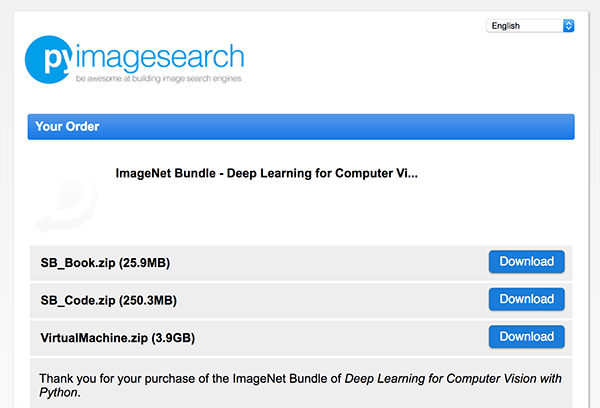
This is your purchase page and where you will be able to download your files. Left click on each file and your download will start.
All files that start with the prefix SB are part of the Starter Bundle. Files that start with PB are part of the Practitioner Bundle. And finally, file names that start with IB are part of the ImageNet Bundle.
File names that include *_Book.zip contain the PDF of the respective bundle. File names that include *_Videos.zip contain the videos for the bundle. File names including *_Code.zip contain your code/datasets associated for the bundle. For example, the file name SB_Code.zip contains all code/datasets associated with the Starter Bundle. The file name SB_Book.zip contains your PDF of the Starter Bundle.
Finally, the VirtualMachine.zip file contains your pre-configured Ubuntu VirtualBox virtual machine.
Note: At this time only the Starter Bundle contents have been released. The contents of the Practitioner Bundle and ImageNet Bundle will be released in October.
If you close this tab in your browser and need to access it again, simply:
- Open up your inbox.
- Find the email receipt (see section below).
- Click on the “View Purchase Online” link.
From there you’ll be able to access the downloads page.
Please go ahead and download these files at your earliest convenience. The service I use to handle payments and distribution of digital downloads automatically expires URLs after four days for security reasons. If your download ever expires, no problem at all, just refer to the “Reactivating an expired download” section below.
Your email receipt and invoice
A few minutes after you purchase your copy of Deep Learning for Computer Vision with Python you’ll receive an email with the subject: “Your purchase from PyImageSearch is complete”.
Inside this email you’ll find links to view/print your invoice as well as access the downloads page:
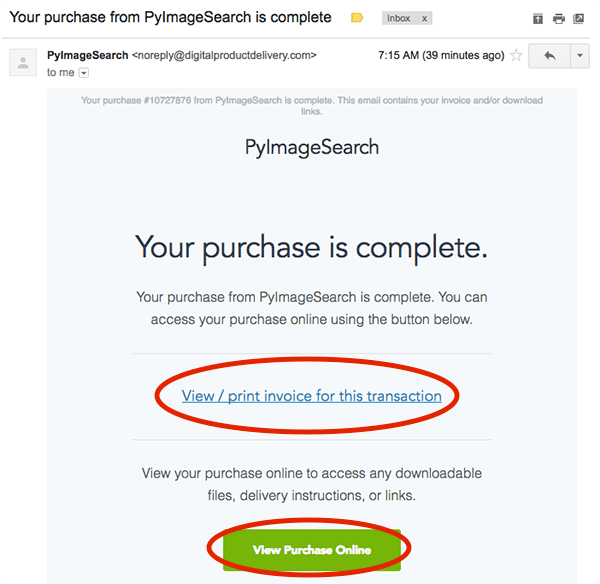
If you did not receive this email, please ensure you are examining the inbox/email address you used when checking out. If you used PayPal you’ll want to check the email address associated with your PayPal account.
If you still cannot find the email, no worries! Please just email me or send me a message from via the contact form and include any pertinent information, such as:
- The email address the purchase should be listed under.
- Your name.
- Any other relevant information you may have (purchase number, whether the payment was made via credit card or PayPal, if a friend/colleague purchased for you etc.).
From there I can double-check the database and ensure you receive your email receipt and downloads link.
Accessing the companion website
Your purchase of Deep Learning for Computer Vision with Python includes access to the supplementary material/companion website.
To access the companion website:
- Download the PDF of the Starter Bundle.
- Open the Starter Bundle to the “Companion Website” section (page 15 of the PDF).
- Follow the link to the companion website.
- Register your account on the companion website by creating a username and password.
From there you’ll be able to access the companion website:
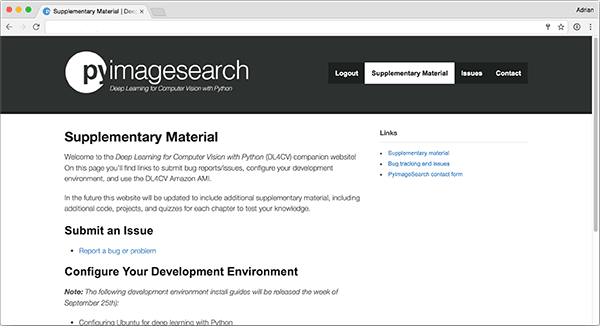
Right now the companion website includes links to (1) configure your development environment and (2) report a bug. In the future this website will contain additional supplementary material.
Posting an issue, bug report, or typo
The most important reason you should create your account on the companion website is to report an issue, bug, or typo.
You can do this by clicking the “Issues” button in the header of the companion website:
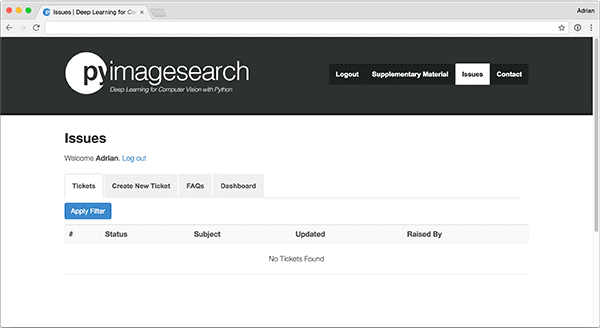
You’ll then see a list of all open tickets.
You can search these tickets by clicking the “Apply Filters” button.
If no ticket matches your query, click “Create New Ticket” and fill out the required fields:
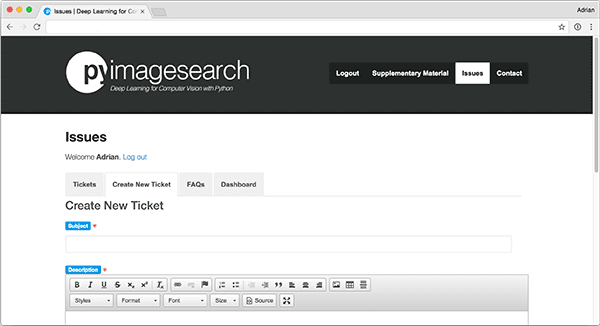
From there, myself and the rest of the PyImageSearch community can help you with the problem.
You can always email me regarding any issues as well; however, I may refer you to the companion website to post the bug so:
- I can keep track of the issue and ensure your problem is resolved in a timely manner.
- Other readers can learn from the issue if they encounter it as well.
Since Deep Learning for Computer Vision with Python is a brand new book, there are bound to be many questions. By using the issue tracker we can keep all bugs organized while ensuring the community can learn from other questions as well.
Reactivating an expired download
The service I use to handle payments and distribution of digital downloads automatically expires URLs after four days for security reasons.
If your URL ever expires, no problem at all — simply email me or send me a message and I can reactivate your purchase for you.
Summary
In this tutorial you learned how to get started with your new purchase of Deep Learning for Computer Vision with Python.
If you have a question that is not discussed in this guide, please shoot me an email or send me a message — I’ll be happy to discuss the problem with you.
Otherwise, if your question is specifically related to a chapter, a piece of code, an error message, or anything pertinent to the actual contents of the book, please refer to the “Posting an issue, bug report, or typo” section above.
Thank you again for purchasing a copy of Deep Learning for Computer Vision with Python.
I feel incredibly excited and privileged to guide you on your journey to deep learning mastery.
Without you, this blog would not be possible.
Have a wonderful day and happy reading!
P.S. If you haven’t already purchased a copy of Deep Learning for Computer Vision with Python, you can do so here.
Join the PyImageSearch Newsletter and Grab My FREE 17-page Resource Guide PDF
Enter your email address below to join the PyImageSearch Newsletter and download my FREE 17-page Resource Guide PDF on Computer Vision, OpenCV, and Deep Learning.



Hopefully my first comment ever!!
So much excited….
Thanks Adrian…
You’re just great!!
Can’t wait to get started in the deep learning journey…..
Thanks, Fahim! Enjoy the book and definitely let me know what you think 🙂
Thanks Adrian
Great news
I’m downloading them and will see what Great and Awesome you did. Thanks
Just browsed through my copy. Worth the wait!!
Thanks, Keith! I’m glad you think so 🙂 Enjoy the rest of the book.
I am so excited! In fact, I am salivating reading through the content page! 🙂 Woohoo~
Thanks Adrian! Keep it flowing!
Thanks Kenny — enjoy! 🙂
Hope one day I can buy also this one. Thanks for the effort. Keep up the good work.
OT: Hard copy of Practical Python 🙂 —> https://imgur.com/a/dU7C5
Hi Adrian,
Is it possible to upgrade from the practitioner bundle, which I purchased, to the Imagenet bundle? If so, how much will it cost and how to place the order?
Thanks!
Hi Chris — you can always upgrade from a lower tier bundle to a higher tier bundle simply by paying the price difference. If you ever want to upgrade just send me a message, let me know which bundle you would like to upgrade to, and from there I can get you the upgrade link.
Thanks Adrian.
You must be exciting to release them, i guess.
We are exciting to read them,i do.
So, everyone is exciting and I don’t why i said Happy New Year to myself just now.
Thanks for the comment!
And yes, I am very excited that the book is being released. It’s been a lot of work and I do believe this is the best resource to study deep learning for computer vision applications.
Hi Adrian,
I already begin reading the book, but I have a small question when we have the mobi version of the book ?
Thanks
It’s probably going to be a few weeks/months until I can get the mobi/ePub versions out. Getting all three volumes of the PDF available are my number one priority. The mobi/ePub versions require A LOT more formatting and that’s not something I can take on until all of the PDF versions are complete.
Adrian, I know this may sound like a dumb post but could you clarify the major differences between ML and DL and when one would be used over the other…..
Hi Gary, that’s not a dumb question at all! I actually cover that as one of the very first chapters inside Deep Learning for Computer Vision with Python, including the history of neural networks, deep learning, machine learning, and how they all intertwine.
Hi Adrian,
I am having very less configuration laptop, i3 with 4gb ram and 2 gb amd graphics. Can my laptop support the VM image which you are giving?
Thanks
It should be able to yes, provide your processor supports virtualization (the vast majority do). If possible I would suggest using a machine with a little more processor speed and RAM, but yes, it will be enough to get you started.
Hello Adrian! I am really liking your new book i read only 30 pages so far but i can already tell it is very well structured and detailed, cant wait to continue my studies!
But before i do then could you please help me understand what does “quantifying the content of the image” actually mean?
One more thing. Could you please tell me if statement below is correct or not:
Feature extraction is a process where we take an image from which we want to extract features and then apply hand-designed image descriptor algorithm which results in vector of numbers, where that vector represent the “hand-designed features”.
Hi Stefan — it’s great to hear that you are enjoying Deep Learning for Computer Vision with Python, that’s awesome!
To address your questions:
1. “Quantifying the contents of an image” means that we apply an algorithm to takes an input image and spits out a list of numbers that represent the contents of an image. If we are quantifying color we might use color histograms. For texture we might use Haralick or LBPs. For structural features we might use HOG. You can even treat pre-trained deep learning models as feature extractors by taking the outputs of arbitrary layers. Basically, image quantification is taking an input image, applying some algorithm designed to characterize the image, and obtaining a feature vector.
2. You are correct; however, keep in mind that while we typically use hand-designed features we may also use pre-trained feature extractors as well.
Deep learning for javascript: https://deeplearnjs.org/
Hello
Are there any updates or I should just start reading this documents ?
DL4CV_StarterBundle.pdf from 20 Sep 2017
DL4CV_PractitionerBundle.pdf from 3 oct 2017
I was busy developing an AI app for 200.000 images using your email training and now I will go to the book
I wrote about your help here
http://videnda.us/2018/02/14/how-i-used-artificial-intelligence-to-organize-200-000-photos/
Thank you and Keep writing !
Dorin Ionescu
Those are the most recent updates for the books but I will have a new update emailed out at the end of February/early March. Be sure to keep an eye on your inbox!
Downloaded today v1.2.0 – Thank you – Keep writing !
Thanks Dorin, enjoy it!
Hi Adrian!
I just bought the Practitioner Bundle and I can’t wait to start. I have one question regarding the PC requirements. I have an Acer Predator g3-593-eh (gtx 1070, 16GB ram, 256 ssd and 750 hdd). I want to know if the virtual machine would work with the gpu.
Regards,
Hey Erick — thank you for picking up a copy of Deep Learning for Computer Vision with Python! I hope you are enjoying it so far.
As for your question, you can run the VM on your PC, but keep in mind that by definition a VM is not allowed to access peripherals such as your GPU. A VM abstracts the physical hardware. Which OS is your PC running?
If you wanted to use your PC for training you certainly can but you would need to configure your local environment or run a Docker instance. Additionally, you may want to use my pre-configured Amazon AMI.
Thanks. I have windows 10. I followed all the steps to install tensorflow, keras, etc…
on my windows machine. Everything works (Well, I had to download opencv-dist from pypi and I “installed” opencv using the .exe file from github. It seems that everything is working).
Hi folk,
i just joined today. wondering if there are any discussion channel ?
Thanks
Hi Kenny — be sure to take a look at the “Companion Website” associated with DL4CV as it includes an Issue tracker/comment system where readers interact.
Just downloaded the image bundle and I am looking forward to a very rich learning experience including a Kaggle competition thanks Adrian and Dave.
By the way, I havenot received an email link to get the hard copy of the book. What should I do.
thanks
Enjoy the book, Reginald! I also just emailed you ~1 hour ago with the link to enter your shipping information (I’m sorry that you did not receive it originally).
Hi Adrian,
I was very excited after reading your blogs on CV and purchased the Practitioner Bundle.
I am very much excited to be a part of this journey of learning more about CV with DL.
Thank you for picking up a copy of the Practitioner Bundle, Nitin! I hope you enjoy it and feel free to reach out if you have any questions 🙂
Hi Adrian,
I just purchased ur ImageNet bundle, looking forward to read it.
Currently we are developing a project in DL/CV so I think this book would be a perfect fit. since many of the team members are new to this area.
Regards
Deepak
Thank you for picking up a copy of the ImageNet Bundle, Deepak! I hope you are enjoying it. Please do let me know if you have any questions.
Hi Adrian,
I couldn’t resist myself from buying the Deep learning for computer vision practitioner bundle book. Hope my lack of knowledge in OpenCV doesn’t hinder my learning.
But I am determined to learn it using your book. Couldn’t resist purchasing the book.
Hoping to learn a lot.
Thanks & Regards,
Ratish
Thank you so much for picking up a copy of Deep Learning for Computer Vision with Python, Ratish! Thank you for supporting both myself and the PyImageSearch blog.
I do use OpenCV occasionally in the book but honestly not very much. OpenCV is only used for basic operations, such as loading an image from disk. Don’t worry if you don’t have much experience with OpenCV, you’ll still be successful when working through the book.
Hi Adrian,
I just purchased your Imagenet bundle.
Just to say : thank you !
🙂
Regards
Jks
Thank you so much, Jerome! Enjoy it and do feel free to reach out if you have any questions.
Hi Adrian,
ready for imagenet bundle !!
so happy to work on it, and reuse all what i can learn since last 20 year,
Just Thank you Sir !
Regards,
Jerome
Thanks so much, Jerome!
I’m experimenting with things and am running into some cases I’d like to discuss – is there a pyImageSearch forum anywhere? If not, that would be an awesome place to compare notes. For example, I’m trying out a 2 category classifier modified off of the ShallowNet CNN in chapter 12 and am seeing 100% precision in the cat class and 0% in the dog class. I’m doing something wrong and would love to pick the brains of other folks.
Hey Matt,
1. Deep Learning for Computer Vision with Python contains an issue/question reporter in the companion website. You can find the link to join the site in the PDF of the book.
2. I include forums inside the PyImageSearch Gurus course. That is another great option as well.
As far as your question goes, you likely forgot to change your categorical cross-entropy to binary cross-entropy.
Thank you, Mr.Adrian for having such knowledge in deep learning and sharing it with us, i just purchased the starter bundle, i will stick to learn in the right way from scratch, using your nice book, i am sure i will enjoy it. see you.
Thank you for picking up a copy, Hitham! Enjoy it and always feel free to reach out if you have any questions.
Hey Adrian,
Starting the ImageNet bundle. Excited. Is there a slack community or something like that.
Thank you for picking up a copy of the ImageNet Bundle, Baradwaj! We don’t have a Slack community but check out the companion website (you’ll find a link in the first few pages of the PDF).